
Download 10LevelUp – AI‑Powered Video Editing Tool for Social Media
Overview
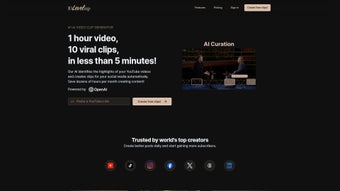
10LevelUp is a cloud‑based, AI‑driven video editing platform designed specifically for creators who need to turn long‑form footage into bite‑size, platform‑ready clips. By automatically detecting highlights, speakers, and key moments, the tool cuts down the tedious manual editing process and delivers polished snippets in seconds. Whether you’re a TikTok influencer, a YouTube vlogger, or a corporate marketer, 10LevelUp streamlines the repurposing workflow, allowing you to publish engaging content across multiple channels without leaving your browser.
The service supports an extensive range of video formats, offers caption generation in over 100 languages, and includes intelligent resizing options that adapt each clip to the specifications of Instagram, Facebook, LinkedIn, and more. Future updates promise auto‑layout switching and one‑click auto‑posting, making 10LevelUp not just a clipping utility but a full‑fledged publishing hub. For creators seeking a fast, secure, and free‑to‑try solution that keeps pace with the rapid demands of social media, 10LevelUp represents a significant step forward in automated video production.
Key Features & Benefits
- AI Highlight Detection: The engine scans your source video, identifies the most compelling moments, and creates short, attention‑grabbing clips automatically.
- Speaker Detection & Segmentation: Distinguishes between multiple speakers, allowing you to isolate interviews, panel discussions, or solo monologues with precision.
- Auto‑Clipping & Smart Trimming: Generates multiple clip options based on duration presets (e.g., 15 s, 30 s, 60 s) and lets you fine‑tune the start‑end points instantly.
- Caption Generation in 100+ Languages: Uses natural‑language processing to produce accurate subtitles, boosting accessibility and SEO performance.
- Customizable Resizing & Aspect Ratios: One‑click conversion to square, vertical, or horizontal formats tailored to each social platform’s best practices.
- Multi‑Format Support: Accepts MP4, MOV, AVI, WMV, and HEVC files, ensuring you can upload footage from any camera or smartphone.
- Cloud‑Based Workflow: No software download required; work from any device with an internet connection, and enjoy automatic saving and version history.
- Future‑Ready Roadmap: Upcoming features include auto‑layout switching, AI‑driven thumbnail selection, and direct auto‑posting to linked accounts.
These capabilities translate into real‑world benefits: creators save up to 80 % of the time they would normally spend manually trimming footage, audience engagement rises thanks to platform‑optimized clips, and multilingual subtitles open new markets without the need for external translation services. By consolidating editing, captioning, and resizing into a single interface, 10LevelUp eliminates the need for a fragmented toolchain, reducing both cost and complexity.
Installation, Usage & Compatibility
Getting Started – No Download Required
Because 10LevelUp is a web application, the onboarding process is straightforward. Visit the official website, click the “Sign Up – Free” button, and create an account using an email address or social login (Google, Facebook, or Apple). After confirming your email, you are taken directly to the dashboard where you can drag‑and‑drop your source video or import it from cloud storage services such as Google Drive, Dropbox, or OneDrive.
Step‑by‑Step Workflow
- Upload Your Video: Supported formats include MP4, MOV, AVI, WMV, and HEVC. The platform accepts files up to 4 GB for free users and up to 10 GB for premium accounts.
- Choose an Editing Profile: Select from preset durations (15 s, 30 s, 60 s) or define a custom length. Enable speaker detection if your video contains multiple voices.
- Generate Clips: Click “Auto‑Clip” and let the AI process the footage. Within moments, a gallery of suggested clips appears, each with automatically generated captions.
- Refine & Resize: Use the built‑in timeline to adjust start/end points, swap captions, or change the aspect ratio (1:1, 9:16, 16:9). Preview the result in real time.
- Export or Share: Download the final clips in your preferred format or directly share them to connected social accounts (TikTok, Instagram, YouTube Shorts) once the auto‑posting feature rolls out.
System Requirements & Operating Systems
Since the service runs entirely in the browser, it is compatible with any modern operating system that supports HTML5 and JavaScript. This includes Windows 10/11, macOS 10.15+ (Catalina, Big Sur, Monterey, Ventura), Linux distributions with a recent Chromium‑based browser, as well as mobile platforms like Android 8.0+ and iOS 13+. For the best experience, we recommend using the latest versions of Chrome, Edge, Firefox, or Safari, and ensuring a stable internet connection of at least 5 Mbps for smooth uploading and processing.
Security is taken seriously: all uploads are encrypted via TLS 1.3, and files are stored temporarily on secure, GDPR‑compliant servers. After processing, you may choose to delete the original footage from the cloud storage to maintain privacy.
Pros, Cons, FAQ & Final Verdict
Pros
- Fully automated highlight detection saves massive editing time.
- Built‑in multilingual captioning expands audience reach.
- Browser‑based, no installation needed – works on Windows, macOS, Linux, Android, and iOS.
- Customizable aspect ratios ensure each clip fits the target platform.
- Future roadmap includes auto‑posting, making it a one‑stop publishing solution.
Cons
- Free tier limits export resolution to 720p.
- Processing large 4 GB files may take several minutes on slower connections.
- Advanced editing (color grading, audio mixing) is not available yet.
- Auto‑posting feature is still in beta and not fully rolled out.
- Dependence on internet connectivity can be a hurdle in low‑bandwidth regions.
Frequently Asked Questions
Is 10LevelUp really free to use?
Yes, 10LevelUp offers a free tier that includes unlimited clips, AI highlight detection, and caption generation up to 720p resolution. Premium plans unlock higher resolution exports, faster processing, and additional storage.
Can I edit the automatically generated captions?
Absolutely. After the AI creates the subtitles, you can edit the text, adjust timing, or replace the language entirely using the built‑in caption editor.
What video formats are supported for upload?
10LevelUp accepts MP4, MOV, AVI, WMV, and HEVC (H.265) files. If your footage uses a less common codec, we recommend converting it to MP4 before uploading.
Is my uploaded content safe and private?
All uploads are encrypted in transit with TLS 1.3 and stored on secure, GDPR‑compliant servers. Files are automatically deleted after 30 days unless you choose to keep them in your account.
When will the auto‑posting feature be available?
Auto‑posting is currently in beta and slated for public release in Q2 2025. Early adopters can opt‑in via the “Beta Features” toggle in their account settings.
Conclusion – Should You Download 10LevelUp?
For anyone serious about scaling their video presence on social media, 10LevelUp offers a compelling mix of AI automation, multilingual support, and cross‑platform accessibility—all without the overhead of traditional desktop editors. The free tier provides enough power to test the workflow, while the premium plans unlock higher‑resolution exports and faster processing for professional creators. Though it lacks deep color grading tools, its core mission of rapid clip generation and platform‑specific formatting is executed flawlessly. If you spend hours manually chopping footage, adding subtitles, and resizing for each network, 10LevelUp will shave that time dramatically and let you focus on storytelling instead of technical chores.
Ready to boost your content output? Download 10LevelUp now, start your free trial, and watch your video workflow become faster, smarter, and more globally reachable.



.png)



